


Identity Lifecycle Management
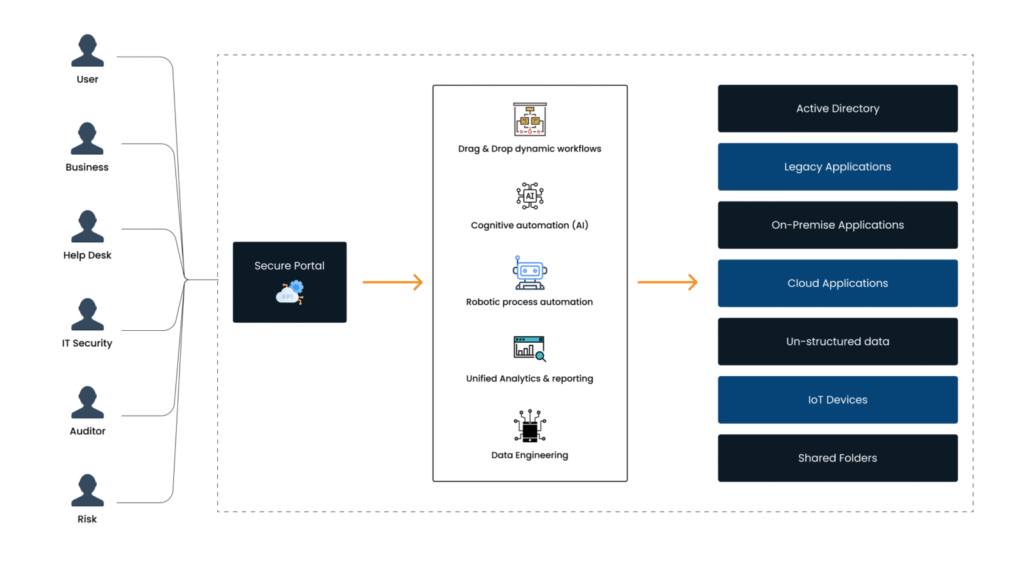
This section automates the onboarding (creation of ADID, email ID, assignment of RSA token, VDI creation), offboarding, amendment, transfers, reactivation. When the source data (e.g. HRMS is changed, IGA will action the change)
Access Lifecycle Management
Once a user’s identity (e.g. ADID) has been created, access to the required applications, servers, databases, network folders, etc. are provisioned for the user based on a role designation matrix. Access is removed/changed when the user is offboarded/role changes
User Access Review
At regular intervals, access review campaigns are set up so a certifier can ensure the right people have access. Access reviews can be done for system access or policies (e.g., who has access to the internet from their work laptop). These can be scheduled or anomaly-driven.
Segregation of Duties
IGA monitors user entitlements in systems and ensures separation of duties exists. SoD monitoring can be done inter system or intra system. IGA looks at the access control lists for each system and compares them with the SoD rule matrix.
Policies Management
These policies play a critical role in enforcing security, compliance, and access control within an organization’s identity management framework. Examples include enforcing a password change at regular intervals and monitoring timebound internet access from work laptops.
Self Serve Portal
User-friendly web interface that enables individuals to manage their own identity tasks, such as password resets, access requests, and profile updates. Empower users, enhance efficiency, and reduce administrative workloads while ensuring compliance and security.
Single Sign On & 2FA
IGA offers single sign-on as well as multi-factor authentication and adaptive multi-factor authentication for all new age as well as legacy applications. IGA also has its own authenticator app that ensures secure access using biometrics.
Privileged Access Management
secures, controls, and monitors access to privileged accounts and sensitive. It helps prevent unauthorized access, enforce security policies, and ensure compliance with regulations by managing and auditing privileged user activities.
Universal Directory
Universal directory, is a centralized database or repository that stores and manages user identities, attributes, and access privileges across various systems and applications within an organization. It provides a unified view of user information.
Reporting & Analytics
IGA’s reporting and analytics provide visibility into user activities, access controls, and compliance status. It streamlines auditing, risk management, and regulatory adherence, strengthening governance and security posture for organizations effectively.